Cygwin has been my preferred tool for installing SSH servers on Windows for over a decade. Cygwin brings a number of standard Unix / Linux tools to Windows.
Once the Cygwin installer is downloaded you will need to launch it in order to select the specific Unix tools that you would like to install. The installer will prompt you to select a mirror and any nearby site will work.
For SSH you will need to select the following Package to be installed:
– openssh: The openSSH server and client programs
-cygrunsrv: NT / W2K service initiator ( to run OpenSSH server as a windows service )
I found an Oracle website that was helpful in the installation. The one change I had to make was creating the user to install the sshd service manually as my user id did not appear to have sufficient permissions to create a new user via the automated script, despite being a member of Administrators. I manually created user cyg_server and assigned to the Administrators group.
I ran into issues attempting to log in using public / private key, and did not try using password authentication, so it is possible that that was working. In event viewer I found that I was receiving the following error each time I logged in. sshd: PID xxxx fatal: setuid XXXXXXXX: Operation not permitted
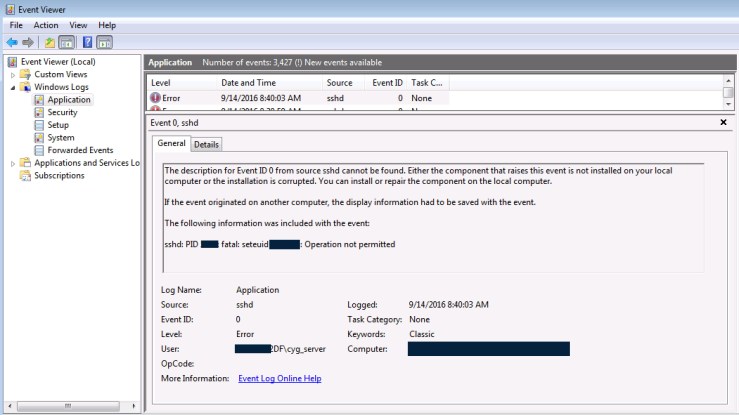
I found the following website on Service User Permissions for Cygwin / SSH that provided some inspriation. I added the following policies to the user cyg_server using Local Security Policy in Local Policies–>User Rights Assignment
- Act as part of the operating system
- Create a token object
- Log on as a service
- Replace a process level token
My tests with these additional policies were still unsuccessful until I restarted. It is possible that not all of these additional policies were necessary.
Once I restarted I was able to successfully authenticate using public / private key. I received the following error however. /bin/bash: Permission denied I was able to resolve this error be performing chmod 755 /bin/bash in Cygwin. At this point I was able to successfully connect to the server using SSH.


Magnificent website. Lots of helpful info here.
I am sending it to several buddies ans additionally sharing in delicious.
And of course, thank you on your effort!
LikeLike
Wow, wonderful weblog format! How lengthy have you been blogging for?
you make running a blog look easy. The total glance of your website is excellent,
as smartly as the content!
LikeLike
I need to to thank you for this fantastic read!!
I absolutely loved every little bit of it. I have you book marked to look at new things you post…
LikeLike